 Priority
 Take a photo
Capture the vehicle and a clearly readable number plate with the Android app.
VEHICLE & VISITOR VEHICLE MANAGEMENT
Replace the paper gate register with vehicle entry and exit logging on an Android phone. Built for security companies and teams managing their own sites.
Android app · Web administration · UK enquiries
Photograph capturedVehicle & number plate
Permit reviewedApproval in the right hands
Ready for reportingFor authorised administrators
AT THE GATE
The guard stays in control. The record stays organised.
Capture the vehicle and a clearly readable number plate with the Android app.
Review the registration, check permit details and request supervisor approval when needed.
Save the movement with its time, gate and guard, ready for later review and reporting.
SEE AN ARRIVAL. FOLLOW THE DEPARTURE.
Watch a guard sign in, capture a contractor’s vehicle, check its permit and record IN. Follow the same vehicle out and see both times in the register.
57-second simulated demonstration based on the app’s screens. Vehicle, people, permit and times are fictional. The example uses included number plate reading and an existing approved permit; the guard checks the plate before saving.
Photograph → check plate → review permit → choose Contractor → IN.
Photograph again → check the same plate → matched entry → OUT.
Review entry and exit with the gate, guard and visit details. Export CSV reports.
ON THE GUARD’S PHONE
A clear capture action keeps the task simple: photograph, check, then record. Your team works at the gate while administrators review the records in the web portal.
See the complete app in a demo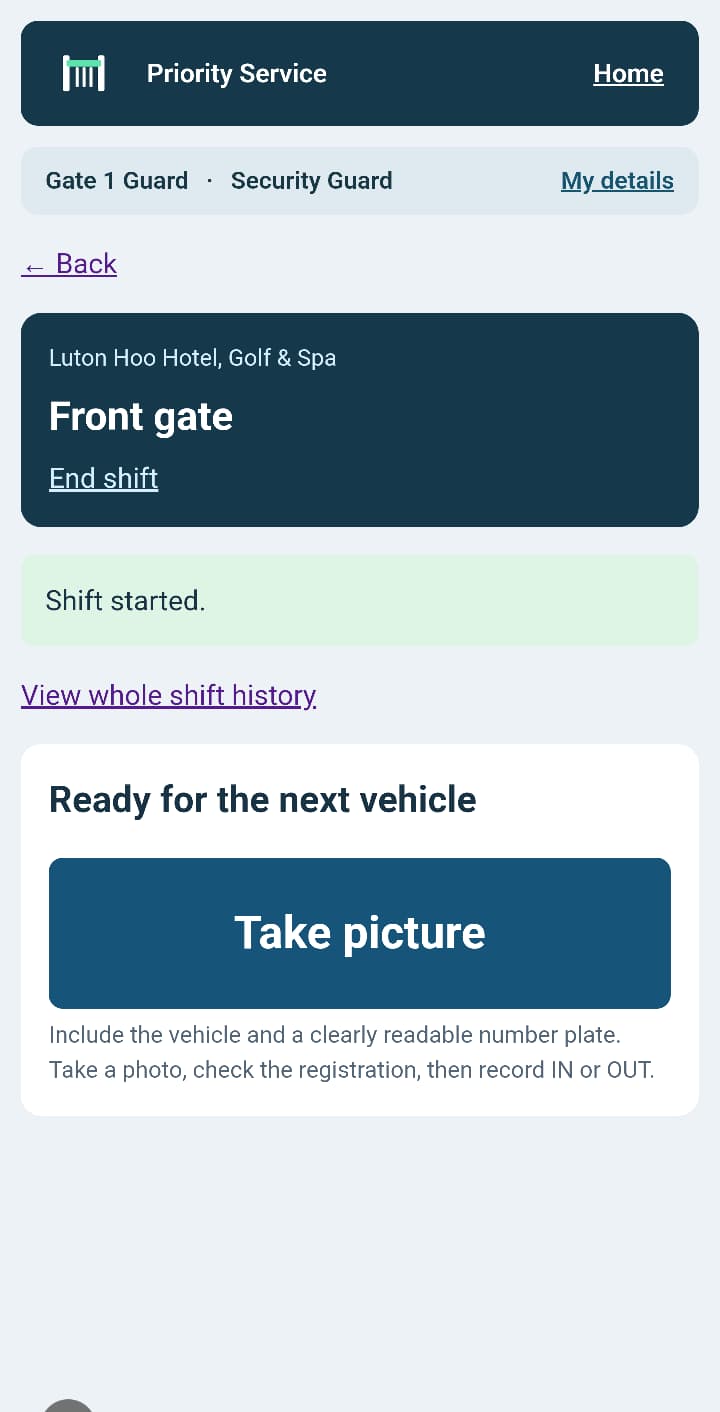
LESS ADMIN. MORE VISIBILITY.
Photograph the vehicle and read its number plate, or enter the registration manually. The guard checks the registration before saving.
Keep time-stamped vehicle movements linked to the site, gate and guard. Find the record without searching a paper register.
Manage vehicle permits and refer vehicles requiring approval to a supervisor. Give each staff role distinct responsibilities.
Authorised administrators can review visit history, filter records and export CSV reports for operational reviews.
Organise sites, gates and staff within your organisation. Keep each team working in the right place.
Plan guard schedules and record shift starts and finishes alongside the gate activity your team handles.
TWO TEAMS. ONE PRACTICAL WORKFLOW.
Give guards a consistent vehicle logging process across client locations, with supervisor approvals and administrator reporting.
Manage visitor vehicles, contractors and deliveries with your own security team. Keep an accessible record of what passed through the gate.
FIND YOUR GATE OPERATION
Explore workflows for security providers, construction gates and warehouse gatehouses.
When a client asks when a contractor arrived or which gate a vehicle used, the answer should not depend on finding the right paper book. Time-stamped movements linked to the gate and guard give your team a searchable record for handovers and operational reviews.
Explore the workflowConstruction gates handle different contractors, suppliers and visitors throughout the day. A consistent vehicle register gives the site team a practical starting point when checking an arrival, reviewing a departure or handing over to the next shift.
Explore the workflowA delivery query may reach the office after the gate team has changed shifts. Searchable registration and movement records help authorised staff review what was entered at the gate, without working through handwritten registers.
Explore the workflowPRICED AROUND YOUR SITE
From £59/month. Unlimited guards. No per-user fees. VAT is not charged.
SINGLE GATE
£59/month
One physical site. One vehicle access point.
Number plate reading included. Live vehicle-data lookup optional: +£20/month.
Request a demoMULTI-GATE
£99/month
One physical site. Two or three connected gates.
Number plate reading included. Live vehicle-data lookup optional: +£20/month.
Request a demoMULTI-SITE / CUSTOM
Let’s talk
A package around your locations and operation.
Number plate reading included. Optional live vehicle-data lookup: +£20/month per organisation.
Request a quoteSET UP FOR YOUR SITE
On-site setup and training are available by arrangement. We work through your gates, staff roles and everyday vehicle workflow before your team starts using Priority Service.
Discuss sites, gates, Android phones, connectivity and who will manage permits and approvals.
Walk guards through arrival, plate checks and departure. Show supervisors and administrators their part in the process.
Practise IN and OUT, review the record and agree your handover process before live use.
Location, availability, scope and any setup or travel charges are confirmed in your quotation before you commit.
BEFORE YOU BOOK
Priority Service is vehicle and visitor vehicle management software for manned gates. Security teams use the Android app to capture vehicle photos, check registrations, record entry and exit, and manage permits. Administrators review records through the web portal.
Both. Security companies can use it at client sites. Organisations with their own security team can use it at construction sites, warehouses, hotels and commercial premises.
Number plate reading from photographs is included in every plan. The guard reviews the result and can correct the registration before recording the movement. Camera quality, lighting and plate condition affect recognition.
Priority Service supports the guard’s recording and approval workflow. Automatic barrier operation and fixed ANPR camera integrations are not part of the features advertised here.
The core record is a vehicle movement. A vehicle log does not prove that every occupant or pedestrian has been registered, and should not be treated as a complete people attendance or emergency roll-call list.
Available make, model and colour may be suggested from MOT data, subject to coverage. The optional live vehicle-data lookup service can retrieve missing details where available. It costs £20/month per organisation with 1,000 chargeable provider lookups shared across its sites; further chargeable lookups cost 5p each. Phone number plate reading and manual entry are included in the base plans.
Yes. We are based in Watford and attend customer sites for setup and training by arrangement. We agree the location, scope, availability and any setup or travel charges before you commit. Contact demo@priorityservice.co.uk, Monday to Sunday, 09:00–17:00 UK time. We do not receive visitors at our operating address.
Single Gate is £59/month for one site with one gate. Multi-Gate is £99/month for one site with two or three gates. Unlimited guards are included. Number plate reading and manual registration entry are included. Automatic vehicle details are optional at £20/month per organisation, including 1,000 live lookups; additional lookups are 5p each. See our pricing page for multi-site discounts, annual options and the founding offer. VAT is not charged.
Yes. Watch the short simulated entry and exit demonstration on this page, then request a live demo with your company details and a short description of your gate operation. We will contact you to arrange a suitable time.
LET’S LOOK AT YOUR GATE OPERATION
Tell us a little about your team and the sites you manage. We’ll contact you to arrange a demonstration around your requirements.